
Case StudyDrywall Genie
About Project
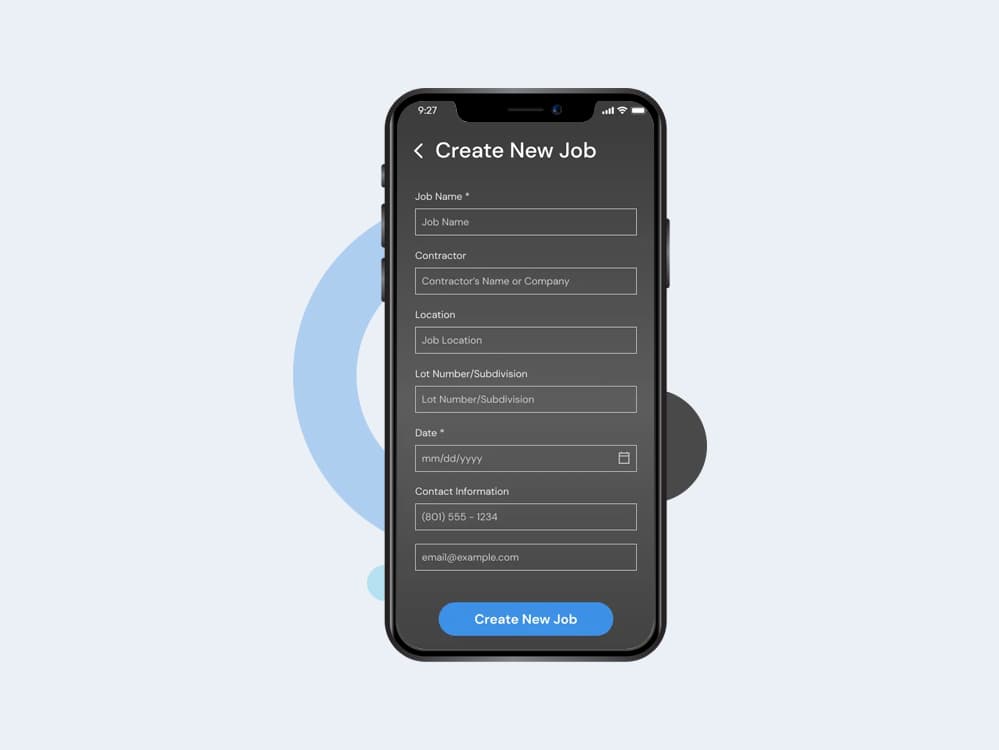
Drywall Genie is a job estimating and material takeoff platform built for drywall contractors. Estimating a drywall job by hand — measuring each room or area, working out how many sheets of which type and thickness are needed, tallying up nails, tape, corner bead and other supplies, and keeping it all tied to the right job, client and delivery date — is slow, error-prone and hard to keep organized across multiple jobs and crews. The objective of Drywall Genie was to give contractors a mobile-first tool that replaces paper takeoff sheets and spreadsheets: create a job, break it into areas (rooms), record the sheets and supplies each area needs, and have the platform automatically roll everything up into accurate square-footage totals and job-wide material lists — all from a phone on the job site. The platform is built as a React Native mobile application backed by a dedicated FastAPI service, giving contractors a fast, native-feeling experience for a workflow that traditionally lived on paper or in disconnected spreadsheets.
Client Requirements
The client required a mobile-first estimating tool purpose-built for the drywall trade, usable directly on the job site, with accurate automatic quantity and square-footage calculations. Key requirements included: Create and manage jobs with contractor, address, lot/subdivision, measurement date and delivery date Break each job down into areas (rooms) with their own sheet thickness and supply needs Support multiple drywall sheet types (regular, 54-inch, and other/custom sizes) with per-area quantities Track supplies (nails, tape, corner bead, etc.) per job area Automatically calculate square footage per area and roll it up to a job-wide total Let each contractor define their own custom, reusable job questions/fields (a "master" template) in addition to the fixed job fields Search and sort jobs by name, job date or most recently edited User accounts with email/password login as well as Apple, Google and Facebook sign-in Configurable data retention — automatically clean up old completed jobs after a period the contractor controls Secure, versioned backend APIs ready for cloud/serverless deployment The system also needed to support many active jobs per contractor without becoming cluttered or slow, and to keep every quantity calculation consistent and trustworthy, since contractors use the totals to order real materials.
Solutions We Delivered
Ogma Conceptions developed the complete Drywall Genie platform: a React Native mobile application and a FastAPI backend.
The mobile application was built with React Native, giving contractors a fast, native-feeling experience for creating jobs, adding areas, and recording sheets and supplies directly from the job site on both iOS and Android from a single codebase. State is managed with Redux and Redux-Saga, keeping API calls, job data and authentication state predictable and centrally testable, while navigation uses React Navigation's stack and drawer navigators to organize the auth flow, job workflow, profile and settings into a clear structure.
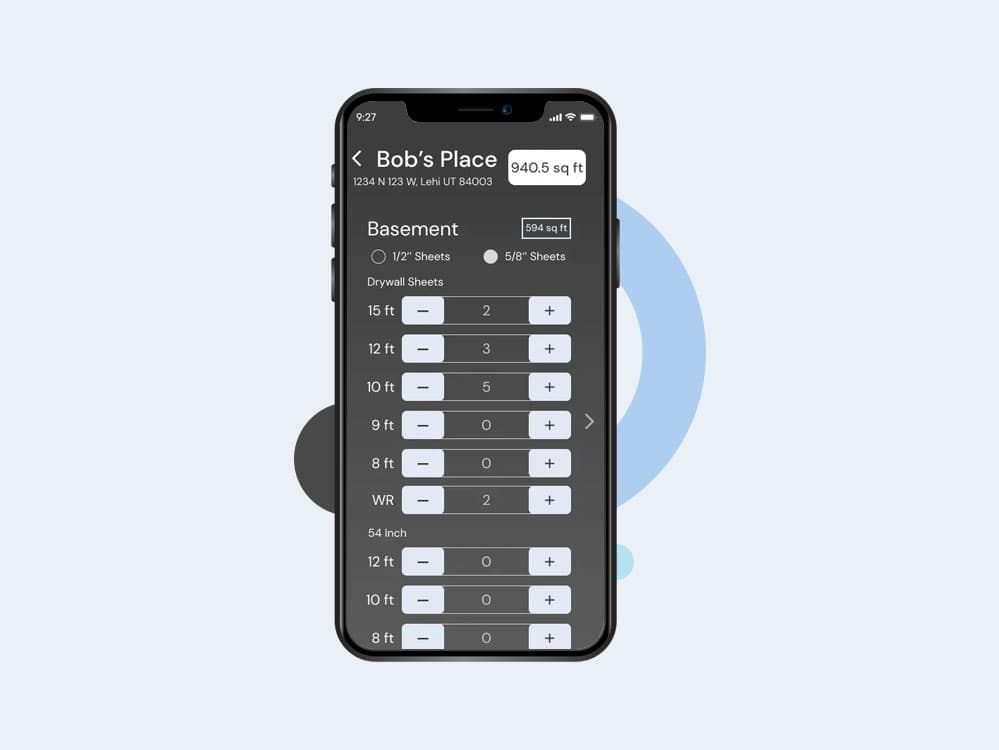
The most complex part of the app is the Add Job Area screen, where a contractor records a room/area's sheet thickness, sheet types and quantities, and supplies — this screen alone reflects the full depth of the backend's nested job → area → sheet/supply data model, and was built with careful state handling so adding, editing and removing rows stays fast and reliable even on a long, detailed job.
Sign-in was built around native SDKs for Google, Apple and Facebook, alongside standard email/password authentication, with session data kept in encrypted on-device storage rather than plain storage. A connectivity check runs before key actions so the app can warn the contractor and avoid silent failures when the job site has poor signal.
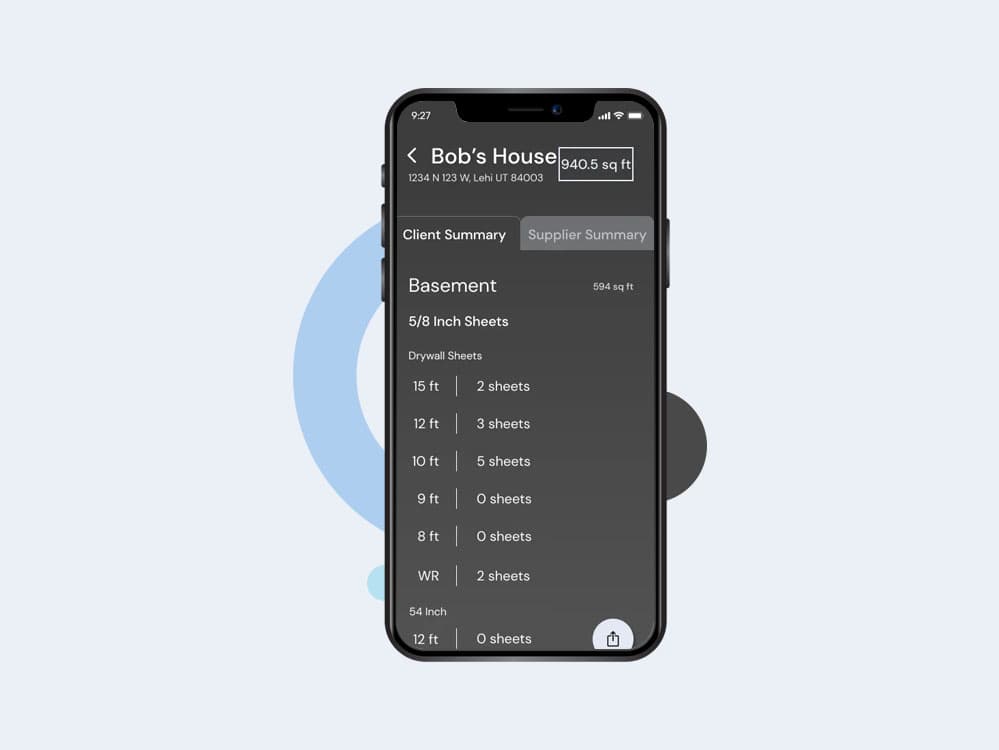
The Job Summary screen lets a contractor generate a complete job total — sheets, supplies and square footage — and send it straight from the app as an email or text message, matching how contractors actually hand off a materials list to a supplier or crew. AdMob banner ads are integrated for the free tier, consistent with the platform's monetisation model.
A dedicated Manage Forms area in Settings gives contractors a UI for maintaining their own sheet types, suppliers and custom job options — the mobile-side counterpart to the backend's master job option system — so contractors can tailor the app to how they work without needing a developer involved.
The backend was built with Python and FastAPI, using SQLAlchemy models and Alembic migrations to represent the full job hierarchy: a Job contains JobAreas, each JobArea links to JobSheets (via a JobAreaSheet join with its own quantity) and JobAreaSupplies, and every layer computes its square footage by aggregating sheet size × quantity up from the area level to the job level. This gives contractors one accurate, always-consistent total no matter how many areas or sheet types a job has.
To support the client's need for flexible, contractor-defined fields, a Master Job Option system was built — contractors can define their own reusable question templates (text, list, boolean, number or custom types, each with optional placeholders and preset answer choices), which are then answered per job as JobOptions, keeping custom data structured and consistently validated rather than free text.
Job search and sorting was implemented directly at the database level — filtering across description, contractor name, address and contact details, and sorting by name, job date or last-edited — so job lists stay fast and relevant as a contractor's history grows.
A configurable job-lifespan setting was added so each contractor controls how long completed jobs are retained before automatic cleanup, checked safely against job creation dates rather than being applied indiscriminately.
Authentication supports both traditional email/password login and SSO (Apple, Google, Facebook) under a single user model, with JWT-based sessions tracked per device/IP so contractors can safely stay signed in across their devices. The backend was also built with dual deployment in mind — running as a standard server or packaged for AWS Lambda — for flexible, scalable hosting.
The application enables contractors to:
- Create a job and break it into individual areas (rooms)
- Record sheet types, thicknesses and quantities per area
- Track supplies like nails, tape and corner bead per area
- See automatic, always-accurate square footage per area and per job
- Answer their own custom job fields alongside the standard job details
- Search, filter and sort their full job history
- Sign in with email/password or with Apple, Google or Facebook
Challenges
A core challenge was modelling a genuinely nested, real-world workflow — jobs contain multiple areas, each area contains its own set of sheets (by type and thickness) and supplies, and every one of those quantities needed to roll up correctly into accurate area-level and job-level square-footage totals. Getting this relational structure right, while keeping every create/update path consistent, took careful data modelling across jobs, job areas, job sheets, job-area sheets and job-area supplies.
A second challenge was flexibility without losing structure. Every contractor works a little differently — some track extra fields per job (like special delivery instructions or lot details) that others don't need. The platform needed to support fully custom, contractor-defined job fields (a master job option template) alongside the fixed core job fields, without turning the schema into an unmanageable free-for-all.
Search and organization at scale was another consideration: as a contractor's job history grows, jobs need to stay searchable by contractor name, address, contact details and description, and sortable by name, job date or most recent activity, without slow queries.
The platform also needed sensible, automatic lifecycle management for old jobs — giving each contractor control over how long completed jobs are retained — without ever risking active or recent job data, and needed authentication that supported both traditional email/password accounts and third-party sign-in (Apple, Google, Facebook) behind one consistent user model.
On the mobile side, integrating native SSO SDKs (Google Sign-In, Sign in with Apple, Facebook Login) and other native modules introduced real build-tooling problems: several third-party React Native libraries still pointed at JCenter, a Maven repository that has been shut down, which broke Android builds until each dependency was patched to pull from Maven Central instead. A bug in a modal library's back-button handling (a leaked event listener) also had to be patched directly, since waiting on an upstream fix wasn't an option for a shipping app.
Finally, the Add Job Area screen — where every sheet, thickness and supply for a room gets entered — needed to stay fast and predictable even though it is by far the most data-heavy screen in the app, mirroring the full depth of the job → area → sheet/supply relationship on the backend.
Key Features
Job & Area Management
Contractors create jobs and break them into individual areas, each with its own sheet thickness and material requirements — mirroring how drywall work is actually measured and quoted room by room.
Automatic Quantity & Square-Footage Calculation
Sheet and supply quantities entered per area are automatically aggregated into accurate area-level and job-level square-footage totals, removing manual tallying and reducing costly ordering errors.
Custom Job Fields (Master Job Options)
Contractors can define their own reusable question templates — text, list, boolean, number or custom — and answer them per job, so the platform adapts to how each contractor works without a rigid, one-size-fits-all form.
Supply & Sheet Tracking
Sheets (regular, 54-inch and other custom sizes) and supplies (nails, tape, corner bead, etc.) are tracked per job area with full quantity detail.
Searchable, Sortable Job History
Jobs can be searched by description, contractor, address or contact details, and sorted by name, job date or most recently edited.
Configurable Job Retention
Each contractor can set how long completed jobs are kept before automatic cleanup, keeping active job lists relevant without manual housekeeping.
Flexible Authentication
Supports email/password login alongside Apple, Google and Facebook sign-in, with JWT-based sessions tracked per device.
Cross-Platform Mobile Experience
Built with React Native for a consistent, native-feeling experience on both iOS and Android from a single codebase.
Instant Job Summary Sharing
Contractors can generate a full job total — sheets, supplies and square footage — and send it directly as an email or text message from within the app.
Secure, Multi-Option Sign-In
Supports email/password sign-in alongside native Google, Apple and Facebook authentication, with session data kept in encrypted on-device storage.
Project Outcome
Drywall Genie was successfully developed as a mobile-first job estimating platform that replaces paper takeoff sheets and disconnected spreadsheets with a single, accurate, always-up-to-date system.
Contractors can measure a job area by area, track exactly what sheets and supplies each area needs, and trust the platform to keep square-footage totals accurate automatically — all without leaving the job site.
By combining a React Native mobile app with a structured FastAPI and SQLAlchemy backend, the solution delivers a fast, native mobile experience backed by a data model that mirrors how drywall jobs are actually measured and quoted, while still giving each contractor room to customize the fields they track.
The modular architecture — jobs, areas, sheets, supplies and custom job options as distinct, well-related entities — also provides a solid foundation for future features such as supplier integrations, materials ordering, or reporting.
Client

Project Links



Country
 US
US
Technologies we used

Alembic

AWS

Docker

FastAPI

JWT

Lambda

MySql

Python

React Native

Redis

SQLAlchemy